Set Up PpRx systemd Service in the GUI
Learn how to set up a systemd service to enable automatic PpRx execution on boot.
Overview
The host computer can be configured to automatically execute PpRx on boot.
On Ubuntu devices, this can be accomplished with a systemd service. This tutorial shows how
systemd services can be created and managed within the GUI application.
The systemd service created by the GUI application is an example configuration. Production systems
may require a custom service definition.
The GUI-created systemd service is intended to run on live RadioLion data streams.
The service waits for a valid radiolion device to be present in the filesystem before executing PpRx.
Steps
PpRx systemd services can be managed from the PpRx Service Manager dialog within the GUI.
To open this dialog, select Run → PpRx Service Manager from the menu bar. The PpRx service
manager dialog will look like this:
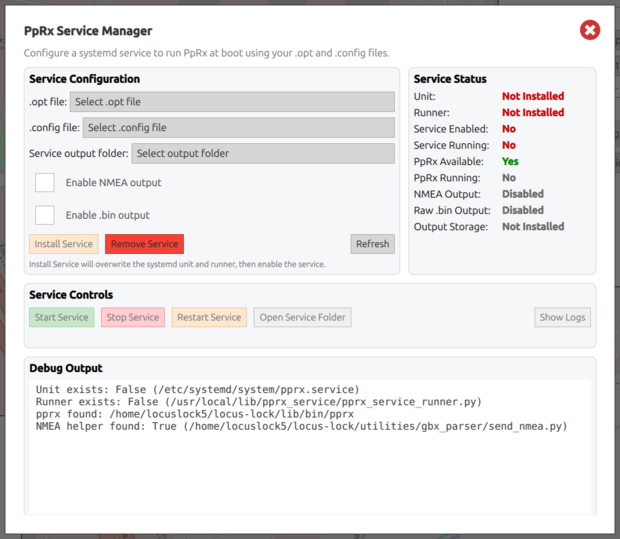
Select the PpRx .opt and .config files and the service output folder.
The service will create subfolders within the service output folder with names based on the system time
at which the folder was created. A new subfolder will be created for each PpRx run the service attempts.
The service is capable of outputting three types of data products:
- GBX data to file [required]
- NMEA GPGGA and GPRMC sentences to file or UDP port [configurable]
- Raw RF data samples to file [configurable]
For this tutorial, all output products are configured:
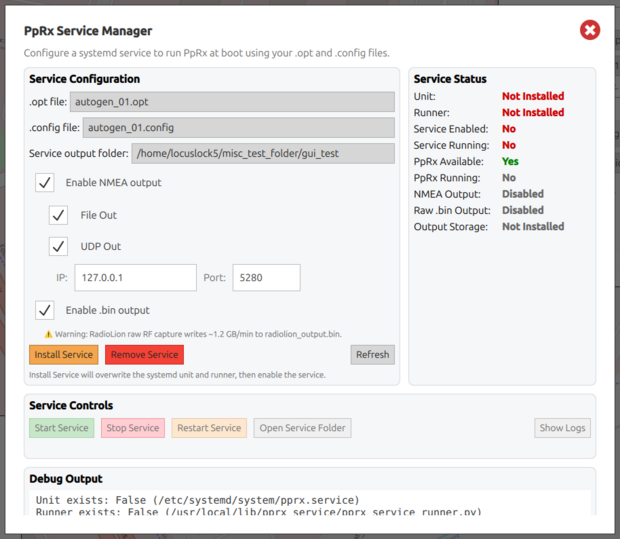
To install the systemd service, press Install Service.
If a valid radiolion device is available, the service will automatically run PpRx.
The right-hand pane should then indicate that the service is installed and active.
The PpRx display of the current running service can be viewed by selecting Tools → PpRx Display.
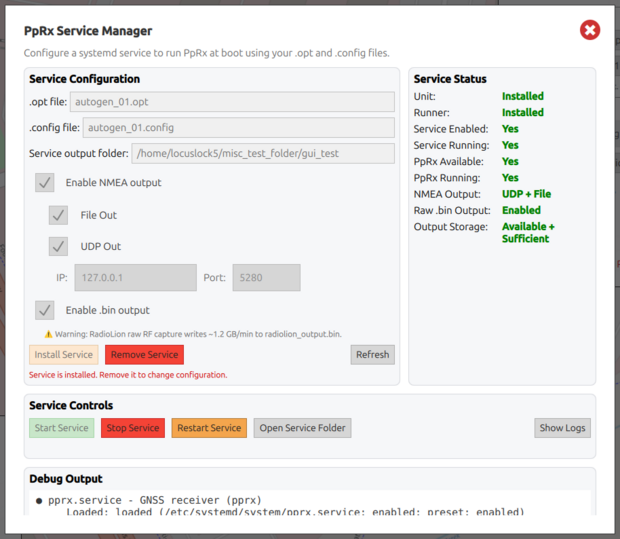
Remove an existing service by pressing the Remove Service button.
The current service must be removed before it can be modified.
An installed service can be controlled using the buttons in the Service Control pane.
Hover over each button for a description of its functionality.
If the PpRx service is running and has been configured to output NMEA sentences on port 127.0.0.1:5280,
then outputs can be viewed by opening a terminal and running:
nc -4 -u -l -k 5280
Expected Result
For each PpRx run attempted by the systemd service, a subfolder will be created within the configured
Service Output Folder. Each subfolder will contain:
- PpRx
.optand.configfiles used in that run diagnostics.loganddisplay.logfiles- The output
.gbxfile - If configured, NMEA and raw RF data files