Record RadioLion Data
Capture a reproducible RF dataset you'll lean on for future debugging and tuning sessions.
Overview
Recording raw RF/IMU data from the RadioLion gives you a known-good .bin file you can replay through PpRx as many times as you want. Every later step is dramatically easier when you can re-run against an unchanging dataset instead of chasing a live sky: comparing PpRx versions, tuning .opt and .config, debugging a regression, and so on.
You're done with this tutorial when you have a .bin file on disk. Even 30 seconds is enough to move on.
Data can be captured via either the GUI or CLI. The .bin file extension is recommended, but not required.
Prerequisites
- A suitable GNSS antenna plugged into the RadioLion.
- A benign RF environment for your first capture: record outdoors with a clear view of the sky, away from likely sources of interference.
Recording data from RadioLion is storage intensive: ~1.199 GB/min of RF data and ~162.45 kB/min of IMU data. Pick your output folder accordingly.
Recording Raw Data via GUI
To record data via the GUI, select the Run → Record Raw Data option in the menu bar.
This brings up the following dialog:
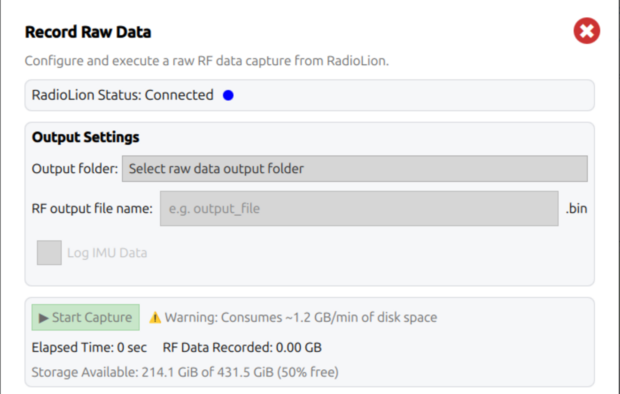
Select an output folder and name for the raw data recording (.bin extension is added automatically).
Checking Log IMU Data will also record raw IMU data from the RadioLion.
If the RadioLion Status is Connected, a capture can be started by pressing the Start Capture button.
During raw recording, the dialog will indicate storage used and elapsed time. The user cannot close the dialog window until data recording is stopped.
Recording Raw Data via CLI
To record data via the CLI, open a terminal window and verify the RadioLion devices are present. Then start a capture with dd:
ls /dev/rad*
    # Check for RadioLion device nodes

sudo dd if=/dev/radiolion0 of=test_01.bin
    # Start a capture from the lower-enumeration RF data stream
The dd command produces no output while it is running, but prints a summary after the capture is stopped with Ctrl+C.
For short captures, plain dd is usually sufficient. For long captures, or when live throughput and size information are required, pipe the stream through pv (pipeviewer).
dd if=/dev/radiolion0 | pv | dd of=test_01.bin
    # Start a capture with live progress output
pv may not be installed by default. Install it with:
sudo apt install pv
If pv is unavailable, use dd with the status=progress flag as a fallback:
sudo dd if=/dev/radiolion0 of=test_01.bin status=progress
To also record IMU data via CLI, start the RF capture first, then open a second terminal and run:
sudo dd if=/dev/radiolion1 of=test_01_imu.gbx
    # Record IMU stream. Must be started after the RF stream is running
You now have a raw RF capture from your RadioLion sitting on disk as a .bin file. From here on, every PpRx run, configuration change, and version comparison can be re-tested against that exact same input. Any difference you see is the change you made, not a change in the sky.